
Based on our workshop on the same topic. Platform steps may have changed since. The principles still apply. Check current Google documentation before implementing.
B2B Google Ads Bidding Best Practices
Smart Bidding can only bid toward the conversions you track.
If the only signal it gets is a form fill, it optimizes for form fills. A competitor that tracks paying customers can win the searchers who are ready to buy.
B2B makes this harder. Conversion data is scarce, sales cycles are long, and Google Ads wasn't necessarily built with either in mind.
The principle: put comprehensive conversion tracking in place first, bid on the conversion action closest to business value that still has enough volume and a short lag, and guide Smart Bidding with constraints while it learns.
Why B2B bidding starts with conversion tracking
Without conversion tracking, there are no Smart Bidding insights. You and the algorithm are bidding blind.
Assume some of your competitors track offline conversions, such as paying customers and signed deals. In an auction, you signal to Google that you want leads: demo requests or free trial sign-ups. Your competitor signals that it wants paying customers.
If a high-intent searcher close to a final decision triggered that auction, you can't blame Google when the competitor gets that user. You get the leftovers: people who fill in a form and do nothing more.
That is why B2B conversion tracking has to be comprehensive.
4 steps to build comprehensive conversion tracking for B2B
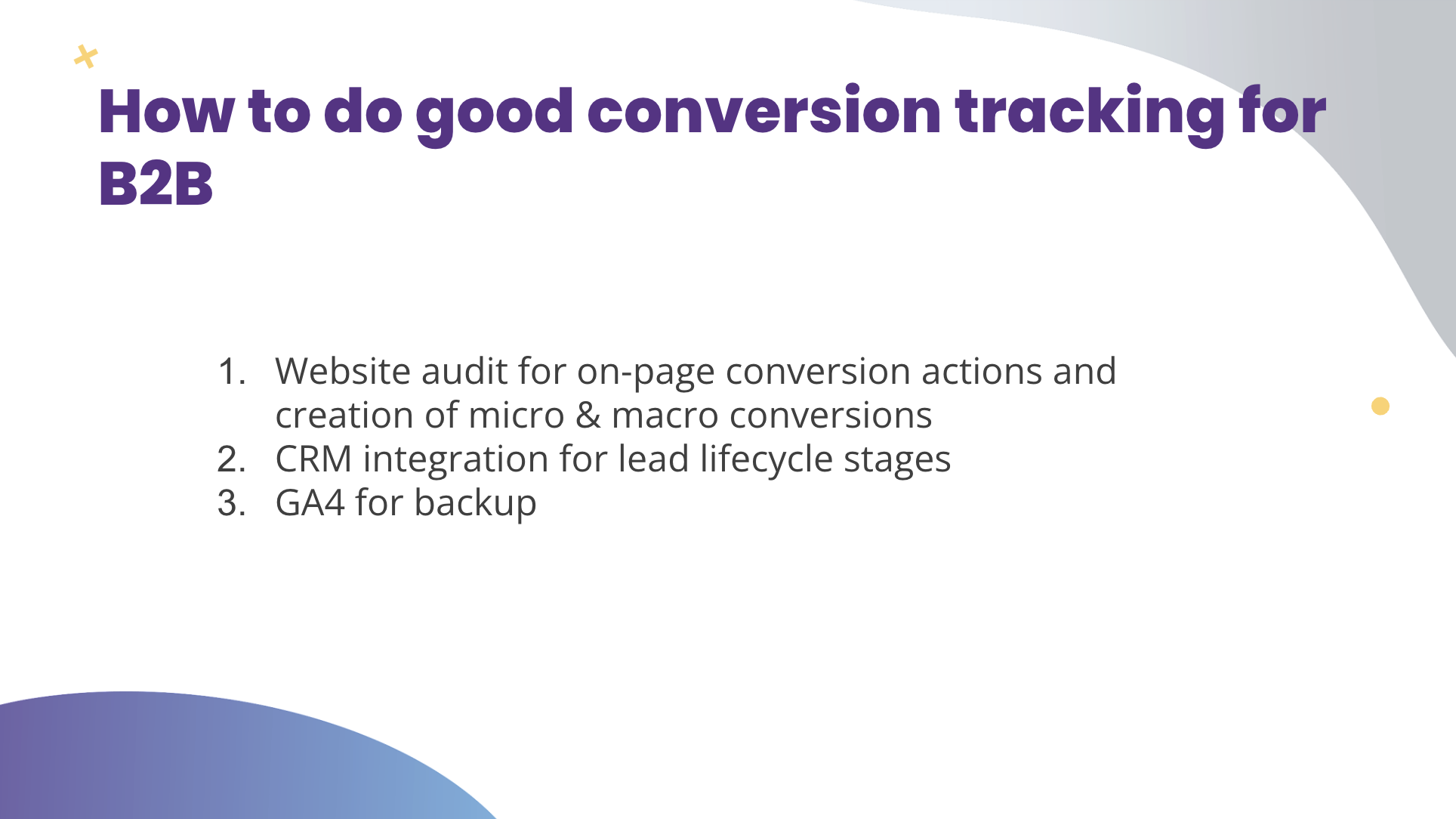
Good conversion tracking for B2B takes three steps:
- A website audit for micro and macro conversions
- CRM integration for lead lifecycle stages
- GA4 as a backup
If you run several Google Ads accounts, one more practice applies: tracking conversions at MCC level.
Step 1 - Audit the website for micro and macro conversions
Document every action a prospect can take on your website, such as viewing a product page or clicking a call-to-action button. Then trace how those actions lead to offline interactions with your sales team, and to customer outcomes.
Macro conversions are the main actions, such as starting a free trial, contacting sales, or booking a demo. Micro conversions, such as scroll depth with time on page or a pricing page visit, show an interested user and qualify them for the next step. They add insight beyond a click, which matters most when form fills are scarce.
Micro conversions can also enrich mid- and bottom-funnel data, such as a pricing quote request or a technical specifications download. We don't see this done much. Classify actions by your own funnel and lead journey, not by a template.
Conversion action structure matters too. If you offer three types of sign-up, track them as three conversion actions, because they are inherently different.
For one client, we separated freelancer sign-ups from team sign-ups, found which campaigns drove better lifetime value, and focused on those for a higher return. A single sign-up action wouldn't have allowed that.
It is often easiest for Google to bring you the conversion with the lowest business value. With one undifferentiated action, more and more of your budget can go toward it.
Step 2 - Connect your CRM and mirror its lifecycle stages
CRM integration is the high-impact step. It takes you beyond optimizing toward lead creation, to signals closer to actual business value.
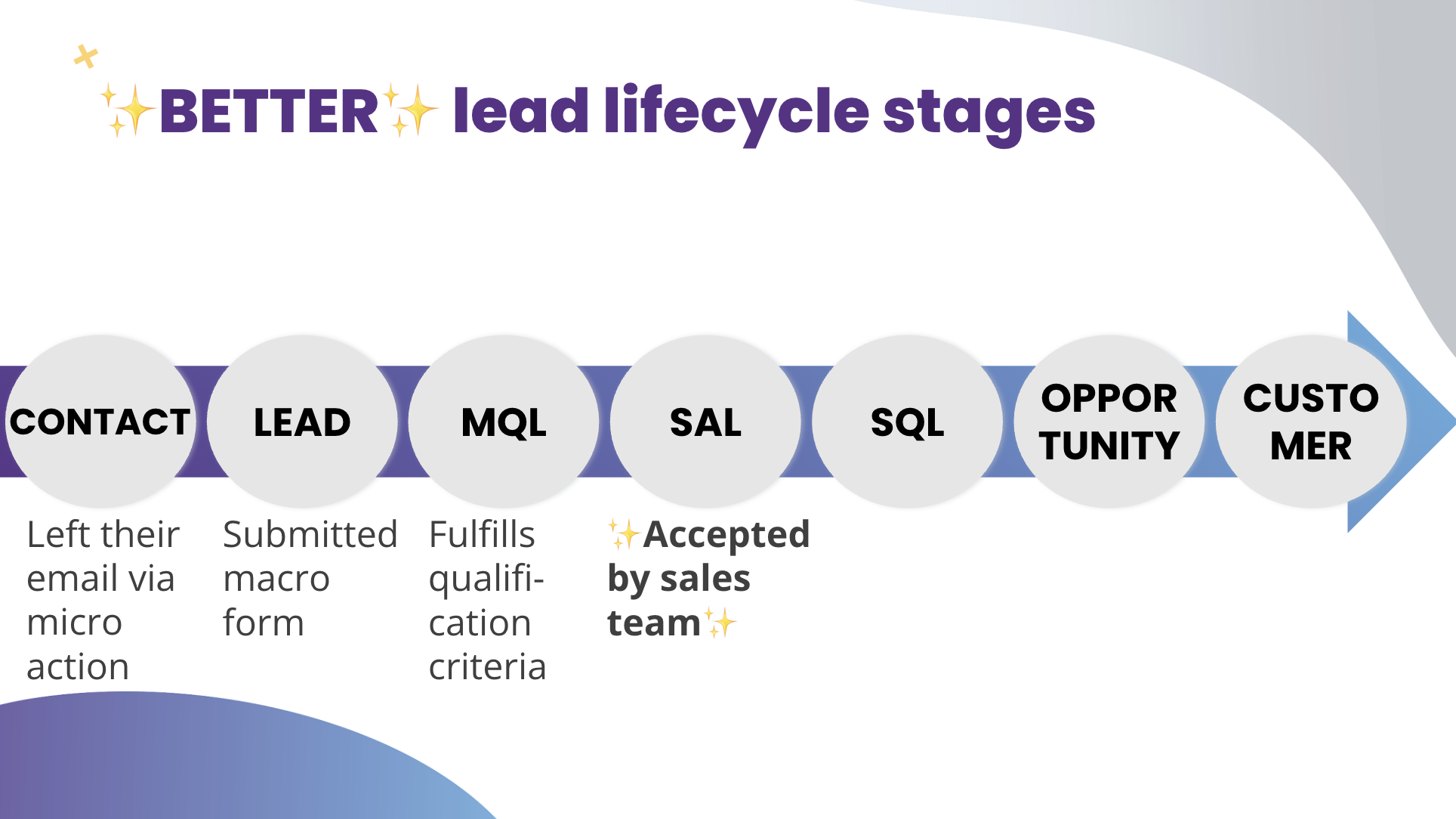
Typical lifecycle stages are lead, MQL, SQL, opportunity, and customer. A more granular set adds contact and SAL (sales accepted lead).
The best lifecycle stages mirror the deal stages in your CRM. There are few valid excuses left for not tracking them: Google Ads has native integrations with CRMs such as HubSpot and Salesforce, and tools like Zapier or Make can connect the rest.
Step 3 - Use GA4 as a backup
Tracking breaks all the time. Someone removes the Google Tag Manager code, or a CRM integration disconnects over an authorization issue or lost access.
Having your conversions set up in GA4 as well protects you from big data gaps, which is crucial when Google Ads carries a substantial budget.
Step 4 - Track conversions at MCC level across accounts
Consolidate your Google Ads accounts, for example one per market, under one MCC and track conversions at MCC level, with a consistent setup across them.
When the markets share a product and a similar audience, this aggregates their data, boosts Smart Bidding's learning power, and reduces fragmentation, which matters most in low-volume B2B.
4 reasons why Smart Bidding is difficult in B2B
We don't believe Google Ads and its algorithms were built with B2B in mind. They are built for large data volumes and simple purchase journeys, like buying jeans rather than expensive enterprise software.
Four things make Smart Bidding difficult in B2B.
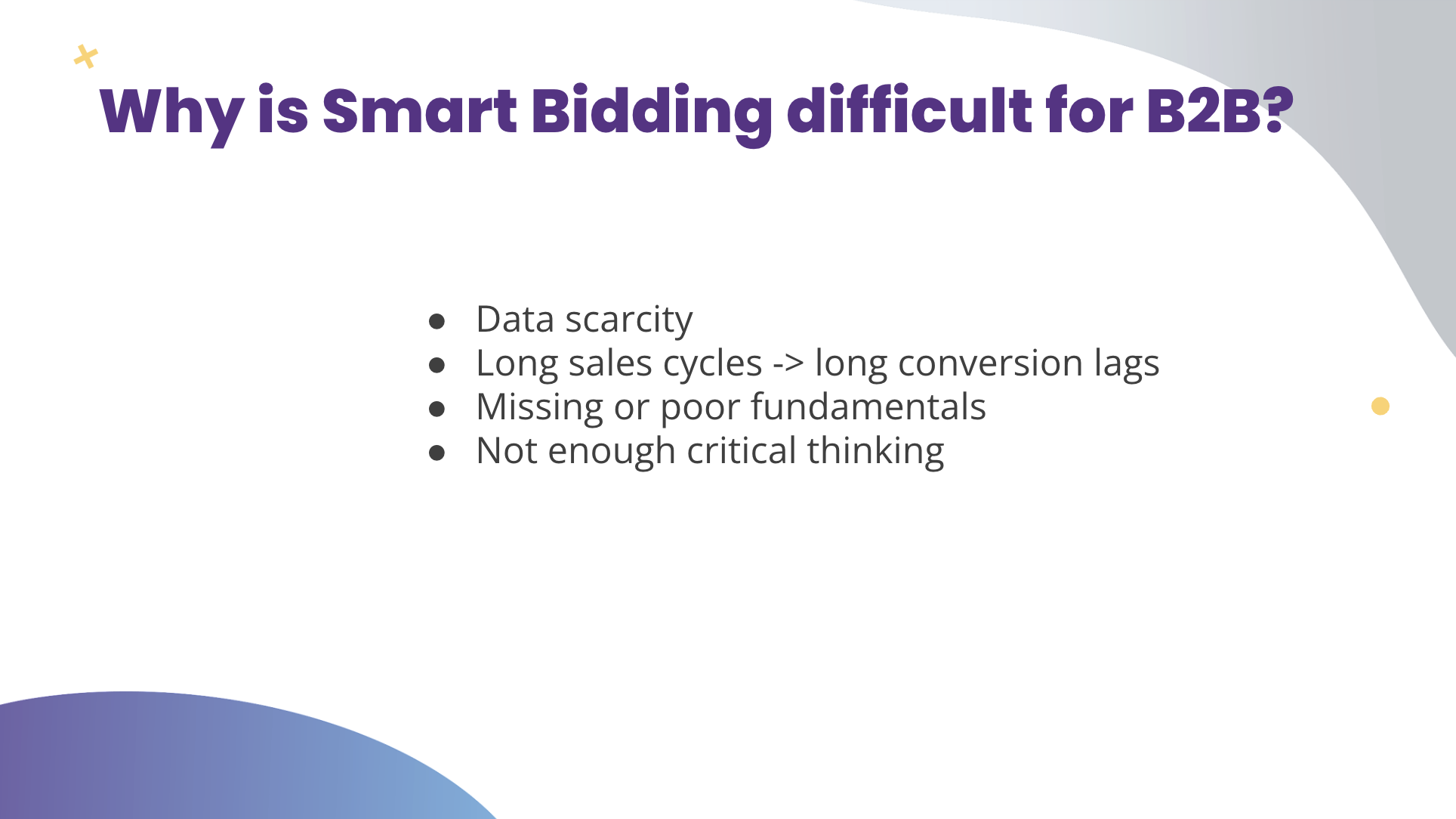
1. Data scarcity
Every B2B company struggles with data scarcity, however big it is, so the algorithm never gets the volumes needed for very high confidence.
Two to four conversions a month won't work as your only signals, because the algorithm takes ages to learn from them.
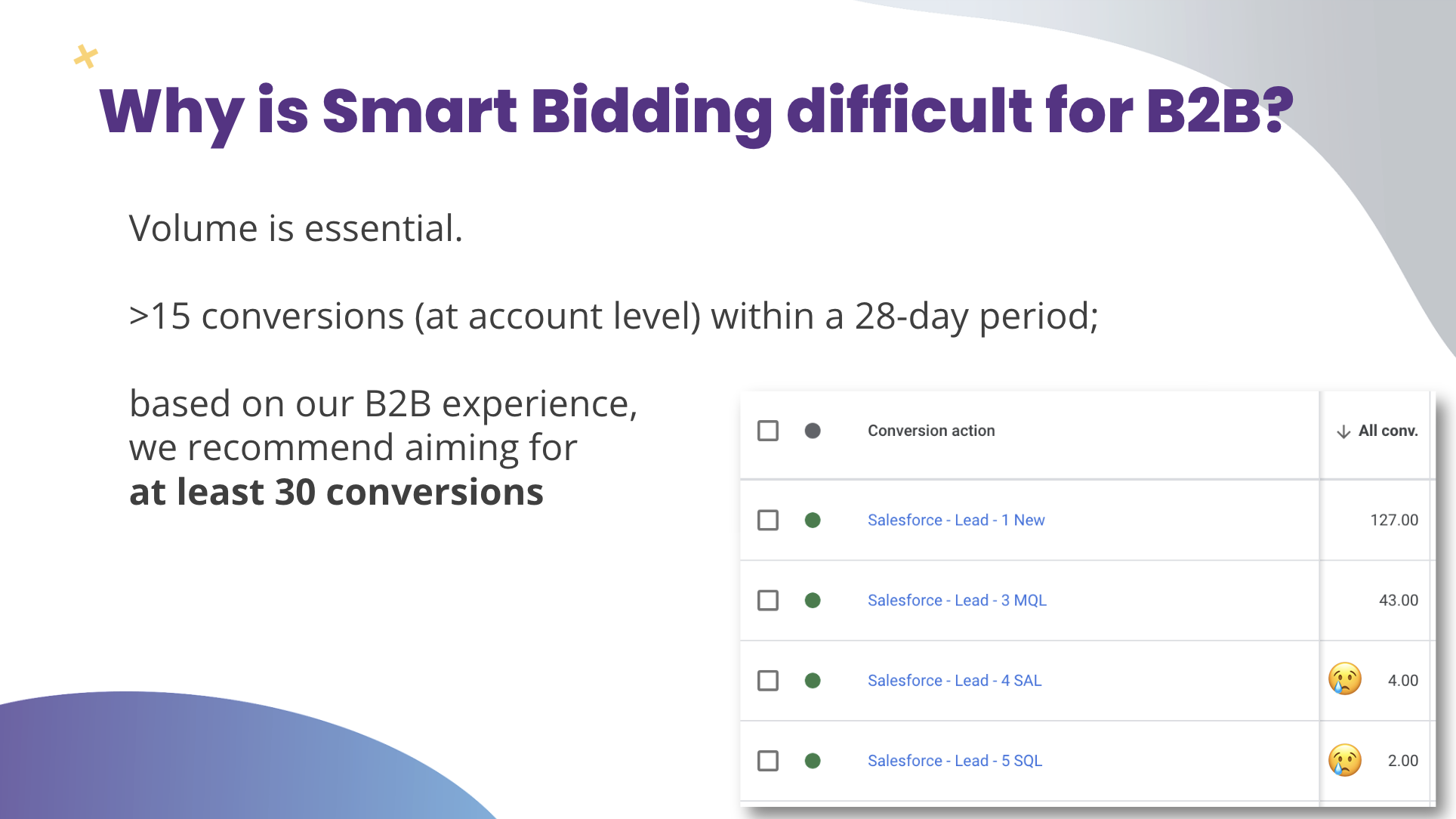
Based on our B2B experience, we recommend aiming for at least 30 conversions within a 28-day period. If that isn't possible, it isn't possible. But 30 is the level where we see Smart Bidding deliver good insights and benefits.
2. Long sales cycles and long conversion lags
Machine learning struggles when the feedback loop is long. Say the algorithm changes its approach, then waits 40 days for the deal to close to learn whether the change was good. Campaigns keep running all that time.
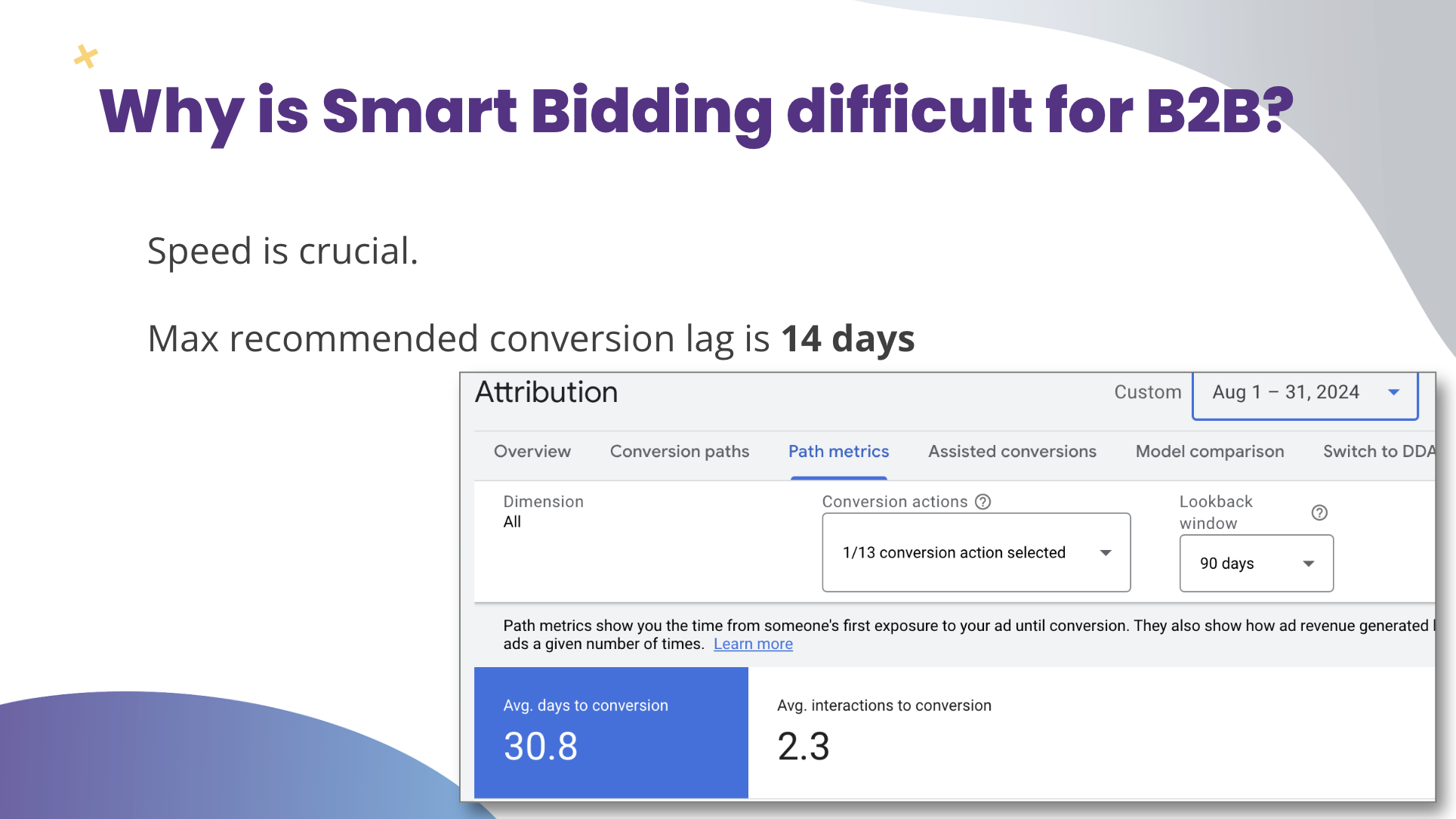
Speed is crucial. We look for a conversion lag of 14 days or less, and shorter is better: a lag of one day or less is ideal.
You only see your lags if you track comprehensive conversion actions. Without them, you can't tell which lifecycle stage is the best fit to bid on.
3. Missing or poor fundamentals
We see this a lot: the basic hygiene isn't in place. Google Ads changes so fast that keeping up is hard even for an agency team doing this full time. If you're a PPC team of one, find people to bounce ideas off now and then.
4. Not enough critical thinking
B2B is a different beast. Its nuances are hard to grasp for someone coming from B2C or e-commerce accounts, and in our view, strategies from those accounts are impossible to make work in B2B.
So don't apply common best practice by default. Think about how to guide the system in a data-scarce environment and which constraints to put in place: maximum bid limits, specific targets, good conversion tracking and account structure, and the right audiences, including first-party audiences.
What Smart Bidding learns from your conversion data
Volume is essential, but more conversion data only helps if it is the right data.
Don't bid on a conversion action with poor-quality data
Say the algorithm learns from 75 leads. Fifteen are relevant and progress through the deal stages. Sixty never get past the lead stage, if they were real people in the first place.
Learning mostly from the 60, the algorithm brings you more leads like them over time. The effect compounds, and performance declines from this setup alone. Avoid optimizing toward a lead stage with a high share of poor-quality data.
Smart Bidding doesn't understand your conversions or your funnel
Naming a conversion action "Paying customer, highly relevant!" gives Google no more insight than "Filled in a form." Conversions have meaning for people. For Smart Bidding, they are binary: there is a conversion, or there isn't.
Smart Bidding also isn't funnel aware. It doesn't know that some conversion actions precede others as leads progress toward a final goal, and adding more actions doesn't teach it your funnel. To signal a funnel, look at value-based bidding.
Value-based bidding can work for B2B, but the requirements are tough
Value-based bidding was mainly meant for e-commerce. In B2B, assigning values from your CRM to conversion actions is a way to show Smart Bidding which actions are worth more to your business. It can work, but it is an advanced strategy.
How value-based bidding differs from conversion-based bidding
Conversion-based strategies such as Target CPA and Maximize Conversions treat each conversion as a yes or a no. Target CPA bids per conversion, predicting the conversion rate of each click.
Target ROAS adds value as a signal. Given conversion values, mainly dynamic ones from real-time data rather than a static average, it bids on the revenue potential of each impression, recognizing that some users are worth more than others.
The two rest on different assumptions, so you can't mimic Target CPA with Target ROAS. Don't use value-based bidding if you optimize toward only one conversion action with a static value. It is the worst option, and you're better off with Target CPA.
Static values per stage are no longer best practice
A common approach some time ago was to value each funnel stage using the conversion rates between stages. If a customer is worth €10,000 on average and 40% of opportunities become customers, an opportunity is worth €4,000, and so on down the funnel.
This isn't ideal. Value-based bidding thrives on dynamic values, and static values set stage by stage, combined with Target ROAS, are no longer best practice.
Static values also miss each lead's true revenue potential. A fixed value for every demo request ignores that a demo from a large enterprise might convert better, or bring more revenue, than one from a small business.
The requirements: one stage, enough volume, a short lag
Value-based bidding needs three things:
- Conversion actions on a single funnel stage. Because Google isn't funnel aware, it recommends choosing one stage instead of pooling contacts, MQLs, SALs, and SQLs together. Use value-based bidding across the conversion actions within that stage.
- Enough volume. The added value signal makes this a more complex algorithm than conversion-based bidding, so it needs the volume we recommend above before you start, and more is better.
- A conversion lag of 14 days or less. A longer feedback loop slows learning and leaves room for a lot to go wrong, especially when data is also scarce.
In B2B, the stage that fits is most often MQL
In B2B, MQL is the stage most likely to meet all three requirements. That is a "probably," based on what we have seen in audits and client accounts. SAL, SQL, or ideally customer can also work, but most B2B accounts don't get enough customers from Google Ads each month to use them as the single conversion action with confidence.
In one client account, every conversion action we used for value-based bidding was at the MQL stage: 102 conversions at account level, with an average conversion lag of 2.2 days. We segmented the MQLs by company size in HubSpot. An extra-small company's MQL was worth 100 euros and an enterprise MQL 2,000 euros, 20 times as much, which let us optimize for higher-value enterprise leads.
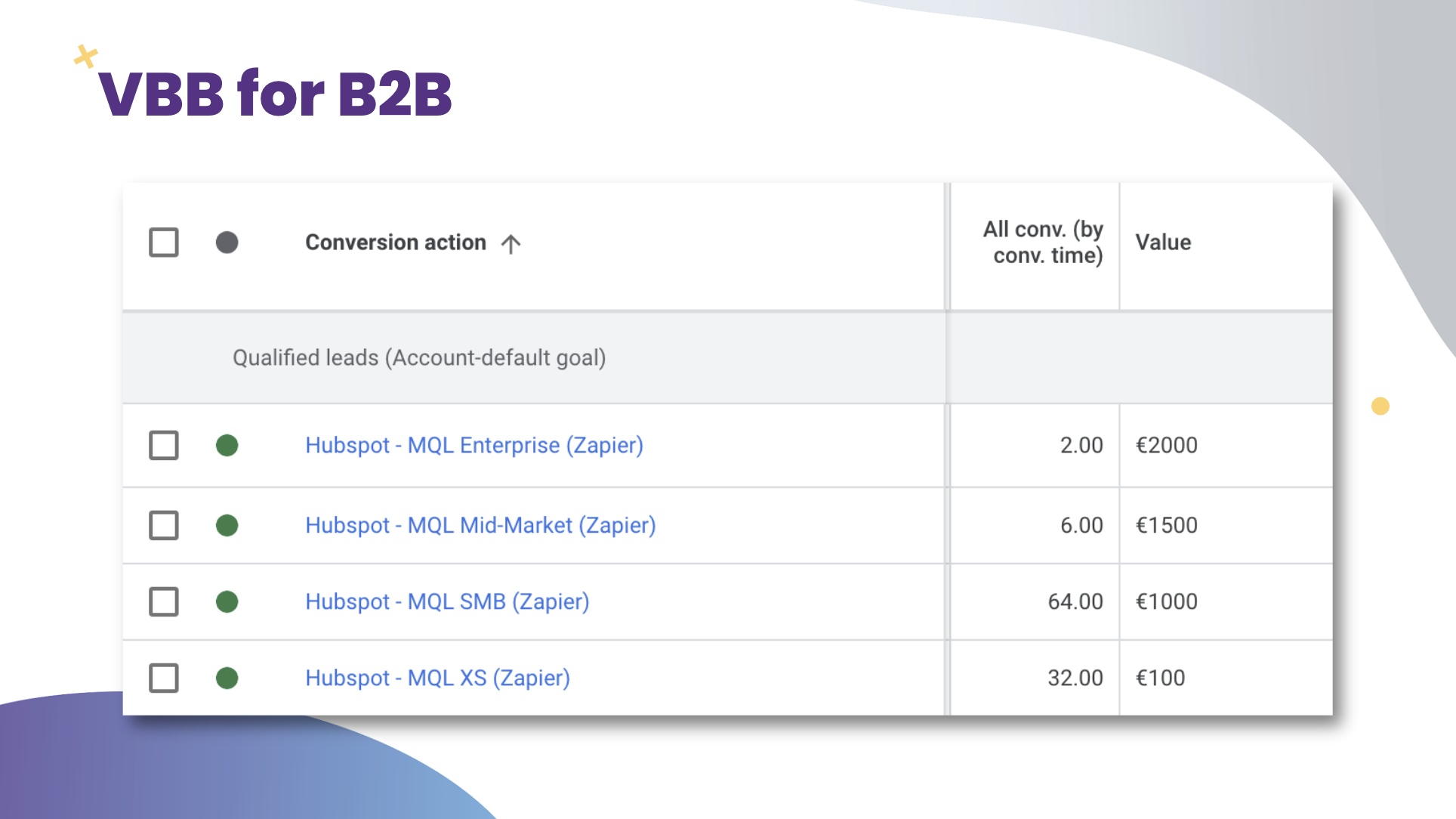
A simplified setup: free trial and demo booking
A simpler version uses two conversion actions, such as a free trial and a demo booking. If leads who go through a demo with your sales team are more likely to become paying customers, the demo booking gets the higher value. The difference has to be substantial: 100 versus 150 isn't enough, while 100 versus 300 or 400 lets Target ROAS draw conclusions.
This only works if poor-quality leads and bots can't submit the forms, so improve the forms and consider collecting qualifying data. Otherwise your results get exponentially worse over time.
Because the values are static, this isn't an ideal approach. But it is better than nothing.
3 steps to take before you start Smart Bidding
Smart Bidding makes better bidding decisions than people do with Manual CPC, so using it should be the goal.
It is also a long game. The longer Smart Bidding runs and the more data it gets, the more it improves, and every change you make affects it.
In an oversimplified case with a really good setup and nothing to react to, results would keep improving on their own. In practice, competitors, budgets, and targets change, and you have to adjust to them. Otherwise, let the bidding be: on rich, precise, and reliable conversion tracking, it keeps learning and improving.
Step 1 - Know how niche you are
Ask whether Google has distinct signals about your target audience. The same number of conversions has a very different impact for a loan provider than for transaction reconciliation software, one of our clients.
Google understands lending well, but has very few audience signals for reconciliation software. A practical check: if none of Google's predefined in-market or affinity audiences fits your niche, assume Google has no niche insights and bids based on broader audiences.
Step 2 - Choose the conversion action closest to business value
Your primary conversion action should be the one closest to actual business value. If you have enough data on customers, make them the primary conversion action for the whole account. If not, work backward through the funnel to SQLs, MQLs, or even on-page lead form submissions.
Ideally, the action you bid on happens on a regular basis, has a short lag, and indicates quality. If none does all three, balance quality against quantity, and test.
Say SQLs are too few to be primary, while MQLs include a lot of irrelevant leads. SALs, with more volume than SQLs and better data than MQLs, could be the stage you optimize toward.
In some of our accounts, a higher-funnel action with more volume worked better. In others, overall results improved with the lower-volume, more relevant one. It depends on your niche and on the signals Google has.
Step 3 - Meet the prerequisites
You can start Smart Bidding with zero historical conversions, using conversion-based strategies such as Maximize Conversions or Target CPA. Good insights come once you reach the volume we recommend above. Until then, a portfolio maximum CPC and holding off on broad match, both covered below, keep the bidding in check.
These prerequisites need to be in place before you start:
- Account structure is sound.
- Keywords are relevant.
- Ad copy is high quality and has a pinning strategy.
- Conversion tracking works, and you track meaningful actions.
- The product or service is relevant and competitive.
- Landing pages are optimized for conversions.
Don't launch a blank account planning to deal with conversion tracking in three months. Postpone the launch, save the budget, and put it into a solid tracking setup, so the algorithm can learn as soon as data comes in.
6 best practices for starting and optimizing Smart Bidding
These keep Smart Bidding under control while it learns, then give it room.
1. Use a portfolio bid strategy with a maximum CPC
Smart Bidding can, and will, go wild with no historical data and no constraints. A portfolio bid strategy with a maximum CPC stops it from testing unreasonably high CPCs and burning your budget before you get any results.
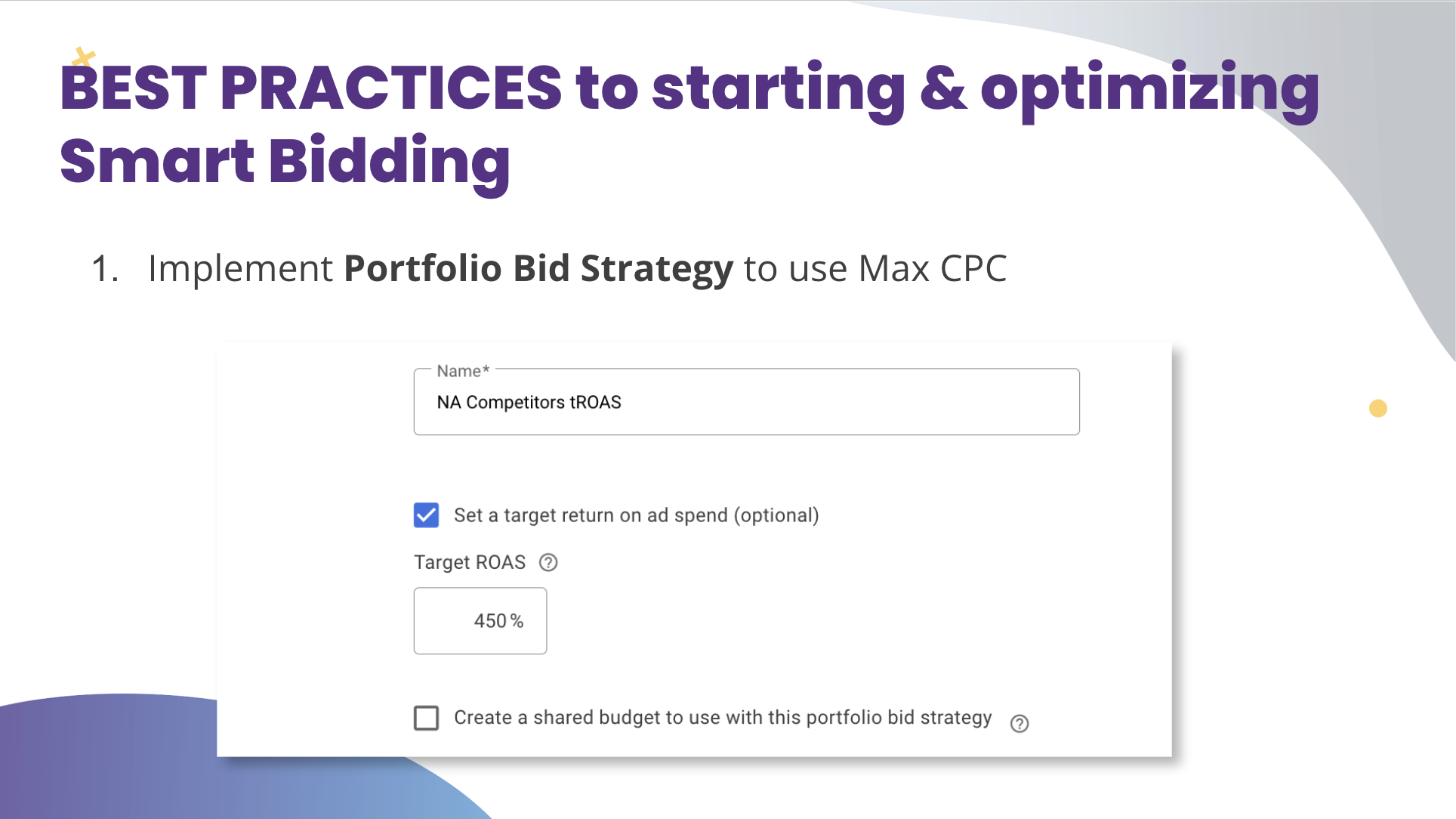
The setting is easy to miss: when you create a portfolio bid strategy, open the advanced options to find the minimum and maximum bid limits. Campaign-level bidding has no such limit, so if a campaign needs its own bidding, put it alone in a portfolio bid strategy.
Portfolios also pool data across campaigns, which reduces fragmentation and helps the algorithm find patterns even for low-volume keywords. Yet we almost never see them in the sizable B2B accounts we audit.
2. Avoid broad match when you start from scratch
Google is very much in favor of broad match, and broad match isn't inherently bad. But with no data to learn from, it can quickly inflate costs.
If you're in a niche, start with high-intent keywords in exact match. If there is little to no volume, add phrase match, and be ready to review search terms daily. That review is the least exciting part of managing an account, but it is very impactful.
Once your conversion actions have data and the algorithm has learned, expand to broad match, choosing which keywords to transition first.
3. Calibrate the maximum CPC as conversions come in
Evaluate and calibrate the maximum CPC frequently, and set it so it doesn't hurt performance. Start low, since there is no data yet for aggressive bidding decisions, and relax it as conversions come in, while reviewing search terms daily.
Once you reach the volume we recommend above, use the Target CPA, rather than the maximum CPC, as your optimization lever.
4. Don't over-tweak your bidding targets
Adjusting Smart Bidding daily does more harm than good. A new Target CPA or Target ROAS, or an entirely new bid strategy, needs at least one conversion cycle, ideally more, to adjust to the new target.
5. Revert to Manual CPC if there's really no improvement
If after two or three weeks conversions really aren't coming in, or the volume is too small, you may need to move to Manual CPC or Maximize Clicks. That risks leaving you with the leftovers, while competitors that optimize toward converting users capture the high-intent searchers.
It isn't proof that Smart Bidding will never work for you. Revisit the prerequisites and best practices to find what went wrong, and consider an independent second opinion.
6. If tracking breaks, exclude that data
When tracking breaks, exclude the data from that period so the algorithm doesn't learn from faulty signals. Google Ads has an option for this.
Frequently asked questions about B2B Google Ads bidding
Short answers to common questions about Smart Bidding in B2B accounts.
How many conversions do you need for Smart Bidding?
Based on our B2B experience, aim for at least 30 conversions within a 28-day period. That is where we see Smart Bidding deliver good insights and benefits, though you can start Maximize Conversions or Target CPA at zero.
What conversion lag is too long for Smart Bidding?
We look for a conversion lag of 14 days or less, and shorter is better: one day or less is ideal. If the conversion you care about most takes longer, bid on an earlier lifecycle stage with a shorter lag that still indicates quality.
Should you optimize for MQLs, SQLs, or customers?
Optimize for the stage closest to business value that you have enough data on. If enough customers come in from Google Ads, make them the primary conversion action for the whole account. If not, work backward to SQLs, SALs, MQLs, or even on-page form submissions.
For value-based bidding, the stage that fits is most often MQL.
Can you start Smart Bidding with zero historical conversions?
Yes, with Maximize Conversions or Target CPA, once the prerequisites are in place. Cap bids with a portfolio maximum CPC and avoid broad match until you have data. Value-based bidding needs volume first.
When should you use Target CPA instead of Target ROAS?
Use Target CPA if you optimize toward a single conversion action with a static value. In that setup, value-based bidding is the worst option.
Target ROAS can work for B2B, but it is an advanced strategy. It needs conversion actions on a single funnel stage, enough volume, and a conversion lag of 14 days or less, and it thrives on dynamic values.
Static values set stage by stage are no longer best practice. Two same-stage actions with a substantial gap between their static values are not ideal, but better than nothing, as long as poor-quality leads and bots can't submit the forms.
Final thoughts and key takeaways
Solid, rich, high-quality conversion tracking is a must. There is no point discussing bidding strategies before you have it: garbage in, garbage out.
Google Ads systems and algorithms aren't necessarily built with B2B in mind, so apply critical thinking. You can't apply all common best practices aimed at B2C and e-commerce. Guide the algorithm with constraints instead.
Meet the prerequisites and best practices if you want results from bidding, and from Google Ads as a whole.
If your conversion tracking isn't there yet, set it up. It is largely a one-time investment, and every week you optimize on garbage data wastes budget.
Any questions or ready to take the next step?
Reach out early and Andres will answer your questions. We accept a limited number of new partnerships each quarter to maintain our service quality.
